Wednesday, May 13, 2015

Quick way to send a file using sendmail on Amazon linux instance

Many times you may want to sent a particular excerpt from a config file or run output from a program to your email for better parsing. The "sendmail" provides a handy way to do that quickly and you can follow the steps below:-

1. Install uuencode utility to encode the file as binary

***********
$sudo yum install -y sharutils
***********

2. Now if you try to use sendmail as "ec2-user", you will see a permissions issue as below:-

***********
$uuencode ~/testfile.txt | sendmail -s "test" test@example.com
sudo sudo uuencode ~/testfile.txt | sendmail -s "test" test@example.com
WARNING: RunAsUser for MSP ignored, check group ids (egid=500, want=51)
can not chdir(/var/spool/clientmqueue/): Permission denied
Program mode requires special privileges, e.g., root or TrustedUser.
***********

3. You can sudo in a root and try the same command again

***********
# uuencode /home/ec2-user/testfile.txt | sendmail -s "test" test@example.com
#
***********
NOTE - you have to press "Ctrl-D" to have sendmail send the mail.

Tuesday, May 12, 2015

Smallest AWS VPC cidr block where it can be partitioned to public and private subnets

The typical VPC cidr block ranges from /16 to /28. However, if you create VPC with /28 cidr block, then there is not enough number of hosts within that cidr block to partition into private and public subnets (out of the available 16 there are 5 reserved AWS for internal use). For calculating number of available hosts per subnet cidr block, you can use the below tool:-

http://mxtoolbox.com/SubnetCalculator.aspx

If your architecture requires you to have hosts that need to run in private subnets, then you can allocate a /27 VPC cidr block and then create 2 subnets (private, public) within that VPC and now you will have 11 available hosts per subnet. Once you arrive at that number, then you can provision the VPC and separate out the subnets and route tables as below:-

1. Create the VPC with /27 cidr block

**************
$aws ec2 create-vpc --cidr-block 172.168.0.0/27 --query Vpc.VpcId 
"vpc-724b7e17"
**************

2. Create an internet gateway

**************
$aws ec2 create-internet-gateway --query InternetGateway.InternetGatewayId 
"igw-4e68062b"
**************

3. Attach the internet gateway to the VPC

**************
$aws ec2 attach-internet-gateway --internet-gateway-id igw-4e68062b --vpc-id vpc-724b7e17 
**************

4. Create a subnet within the VPC

**************
$aws ec2 create-subnet --vpc-id vpc-724b7e17 --cidr-block 172.168.0.0/28 
{
    "Subnet": {
        "VpcId": "vpc-724b7e17",
        "CidrBlock": "172.168.0.0/28",
        "State": "pending",
        "AvailabilityZone": "us-east-1c",
        "SubnetId": "subnet-fefdcbc4",
        "AvailableIpAddressCount": 11
    }
}

**************

5. Create a second subnet within VPC

**************
$aws ec2 create-subnet --vpc-id vpc-724b7e17 --cidr-block 172.168.0.16/28 
{
    "Subnet": {
        "VpcId": "vpc-724b7e17",
        "CidrBlock": "172.168.0.16/28",
        "State": "pending",
        "AvailabilityZone": "us-east-1c",
        "SubnetId": "subnet-d4faccee",
        "AvailableIpAddressCount": 11
    }
}
**************

6. Create a route table for the VPC

**************
$aws ec2 create-route-table --vpc-id vpc-724b7e17 
{
    "RouteTable": {
        "Associations": [],
        "RouteTableId": "rtb-a4c1c8c1",
        "VpcId": "vpc-724b7e17",
        "PropagatingVgws": [],
        "Tags": [],
        "Routes": [
            {
                "GatewayId": "local",
                "DestinationCidrBlock": "172.168.0.0/27",
                "State": "active",
                "Origin": "CreateRouteTable"
            }
        ]
    }
}
**************

7. Associate the route table with a particular subnet

**************
$aws ec2 associate-route-table --route-table-id rtb-a4c1c8c1 --subnet-id subnet-fefdcbc4 
{
    "AssociationId": "rtbassoc-04458260"
}
**************

8. Create route for a destination cidr block via internet gateway

**************
$aws ec2 create-route --route-table-id rtb-a4c1c8c1 --destination-cidr-block 0.0.0.0/0 --gateway-id igw-4e68062b 
**************

After the above steps, you can create security groups and then creates rules for ingress and egress. Once that is done, you should be good to launch an instance in the private subnet of the above vpc.

Friday, May 8, 2015

Kernel Hardening parameters recommended by Lynis

The defaults for RHEL 7.1 AMI in sysctl are
------------------------------------------------------------
# sysctl kernel.kptr_restrict
kernel.kptr_restrict = 0
# sysctl kernel.sysrq
kernel.sysrq = 16
# sysctl net.ipv4.conf.all.accept_redirects
net.ipv4.conf.all.accept_redirects = 1
# sysctl net.ipv4.conf.all.log_martians
net.ipv4.conf.all.log_martians = 0
# sysctl net.ipv4.conf.all.rp_filter
net.ipv4.conf.all.rp_filter = 0
# sysctl net.ipv4.conf.all.send_redirects
net.ipv4.conf.all.send_redirects = 1
# sysctl net.ipv4.conf.default.accept_redirects
net.ipv4.conf.default.accept_redirects = 1
# sysctl net.ipv4.conf.default.log_martians
net.ipv4.conf.default.log_martians = 0
# sysctl net.ipv4.tcp_timestamps
net.ipv4.tcp_timestamps = 1
# sysctl net.ipv6.conf.all.accept_redirects
net.ipv6.conf.all.accept_redirects = 1
# sysctl net.ipv6.conf.default.accept_redirects
net.ipv6.conf.default.accept_redirects = 1
------------------------------------------------------------

The documentation on each of these parameters is available here:
https://www.kernel.org/doc/Documentation/sysctl/kernel.txt
https://www.kernel.org/doc/Documentation/sysrq.txt
https://www.kernel.org/doc/Documentation/networking/ip-sysctl.txt
https://www.ietf.org/rfc/rfc1323.txt

------------------------------------------------------------
kptr_restrict:
This toggle indicates whether restrictions are placed on
exposing kernel addresses via /proc and other interfaces.

When kptr_restrict is set to (0), the default, there are no restrictions.

When kptr_restrict is set to (1), kernel pointers printed using the %pK
format specifier will be replaced with 0's unless the user has CAP_SYSLOG
and effective user and group ids are equal to the real ids. This is
because %pK checks are done at read() time rather than open() time, so
if permissions are elevated between the open() and the read() (e.g via
a setuid binary) then %pK will not leak kernel pointers to unprivileged
users. Note, this is a temporary solution only. The correct long-term
solution is to do the permission checks at open() time. Consider removing
world read permissions from files that use %pK, and using dmesg_restrict
to protect against uses of %pK in dmesg(8) if leaking kernel pointer
values to unprivileged users is a concern.

When kptr_restrict is set to (2), kernel pointers printed using
%pK will be replaced with 0's regardless of privileges.
------------------------------------------------------------
sysrq:
SysRq is a key combo you can hit which the kernel will respond to regardless of whatever else it is doing, unless it is completely locked up.
Possible values:
0 - disable sysrq completely
1 - enable all functions of sysrq
>1 - bitmask of allowed sysrq functions (see below for detailed function
      description):
         2 =   0x2 - enable control of console logging level
         4 =   0x4 - enable control of keyboard (SAK, unraw)
         8 =   0x8 - enable debugging dumps of processes etc.
        16 =  0x10 - enable sync command
        32 =  0x20 - enable remount read-only
        64 =  0x40 - enable signalling of processes (term, kill, oom-kill)
       128 =  0x80 - allow reboot/poweroff
       256 = 0x100 - allow nicing of all RT tasks
As we are discussing EC2 instances, physical key presses are not something you would generally expect.
------------------------------------------------------------
accept_redirects - BOOLEAN
Accept ICMP redirect messages.
accept_redirects for the interface will be enabled if:
- both conf/{all,interface}/accept_redirects are TRUE in the case
 forwarding for the interface is enabled
or
- at least one of conf/{all,interface}/accept_redirects is TRUE in the
 case forwarding for the interface is disabled
accept_redirects for the interface will be disabled otherwise
default TRUE (host)
FALSE (router)
------------------------------------------------------------
log_martians - BOOLEAN
Log packets with impossible addresses to kernel log.
log_martians for the interface will be enabled if at least one of
conf/{all,interface}/log_martians is set to TRUE,
it will be disabled otherwise
------------------------------------------------------------
rp_filter - INTEGER
0 - No source validation.
1 - Strict mode as defined in RFC3704 Strict Reverse Path
   Each incoming packet is tested against the FIB and if the interface
   is not the best reverse path the packet check will fail.
   By default failed packets are discarded.
2 - Loose mode as defined in RFC3704 Loose Reverse Path
   Each incoming packet's source address is also tested against the FIB
   and if the source address is not reachable via any interface
   the packet check will fail.

Current recommended practice in RFC3704 is to enable strict mode
to prevent IP spoofing from DDos attacks. If using asymmetric routing
or other complicated routing, then loose mode is recommended.

The max value from conf/{all,interface}/rp_filter is used
when doing source validation on the {interface}.

Default value is 0. Note that some distributions enable it
in startup scripts.
------------------------------------------------------------
send_redirects - BOOLEAN
Send redirects, if router.
send_redirects for the interface will be enabled if at least one of
conf/{all,interface}/send_redirects is set to TRUE,
it will be disabled otherwise
Default: TRUE
------------------------------------------------------------
tcp_timestamps - BOOLEAN
Enable timestamps as defined in RFC1323
TCP timestamps are used to provide protection against wrapped sequence numbers. It is possible to calculate system uptime (and boot time) by analyzing TCP timestamps
------------------------------------------------------------

Most parameter can be modified (with the exception of kptr_restrict) with little impact unless the instance is going to be used for routing/forwarding purposes (such as providing NAT services to other instances).

Wednesday, May 6, 2015

Running periodic host based security auditing using Lynis tool

If you run production systems either on the cloud or even on-premise, there is a need for periodic review and auditing of security of the hosts and the infrastructure to meet compliance requirements. Lynis is an open source security auditing tool that can be run on hosts on periodic basis (as a cron job) and provide the necessary reports for compliance. This utility is a good addition to file integrity and IDS solution like OSSEC.

Lynis can be downloaded from -  https://cisofy.com/lynis/

or can be obtained from github repository using steps below

1. Clone the repository

*************
$sudo git clone https://github.com/CISOfy/lynis
*************

2. To run the audit, simply cd into the directory and run the audit system command

*************
$cd lynis
$sudo ./lynis audit system -Q
*************

The tool outputs the below files for review later:-

- Test and debug information      : /var/log/lynis.log
- Report data                     : /var/log/lynis-report.dat

You can also run the tool as a cron job using --cronjob switch and bash script as detailed in

https://cisofy.com/documentation/lynis/#installation

To check whether you are running the latest version of lynis, you can review the banner of lynis.log

************
[01:59:35] ===---------------------------------------------------------------===
[01:59:35] ### Copyright 2007-2015 - CISOfy, https://cisofy.com ###
[01:59:35] Program version:           2.1.1
[01:59:35] Operating system:          Linux
[01:59:35] Operating system name:     Red Hat
[01:59:35] Operating system version:  Red Hat Enterprise Linux Server release 7.
1 (Maipo)
[01:59:35] Kernel version:            3.10.0
[01:59:35] Kernel version (full):     3.10.0-229.el7.x86_64
[01:59:35] Hardware platform:         x86_64
[01:59:35] Hostname:                  ip-198-162-0-7
[01:59:35] Auditor:                   [Unknown]
[01:59:35] Profile:                   ./default.prf
[01:59:35] Log file:                  /var/log/lynis.log
[01:59:35] Report file:               /var/log/lynis-report.dat
[01:59:35] Report version:            1.0
[01:59:35] -----------------------------------------------------
************

Some of the interesting parts of the report are if you are running Apache or Nginx and some kernel parameter recommendations as well

************
[+] Software: webserver
------------------------------------
  - Checking Apache (binary /usr/sbin/httpd)                  [ FOUND ]
AH00557: httpd: apr_sockaddr_info_get() failed for <ip address>
AH00558: httpd: Could not reliably determine the server's fully qualified domain name, using 127.0.0.1. Set the 'ServerName' directive globally to suppress this message
      Info: Configuration file found (/etc/httpd/conf/httpd.conf)
      Info: No virtual hosts found
    * Loadable modules                                        [ FOUND ]
        - Found 100 loadable modules
          mod_evasive: anti-DoS/brute force                   [ NOT FOUND ]
          mod_qos: anti-Slowloris                             [ NOT FOUND ]
          mod_spamhaus: anti-spam (spamhaus)                  [ NOT FOUND ]
          ModSecurity: web application firewall               [ NOT FOUND ]
  - Checking nginx                                            [ NOT FOUND ]

[+] Software: file integrity
------------------------------------
  - Checking file integrity tools
    - AFICK                                                   [ NOT FOUND ]
    - AIDE                                                    [ NOT FOUND ]
    - Osiris                                                  [ NOT FOUND ]
    - Samhain                                                 [ NOT FOUND ]
    - Tripwire                                                [ NOT FOUND ]
    - OSSEC (syscheck)                                        [ FOUND ]
    - mtree                                                   [ NOT FOUND ]
  - Checking presence integrity tool                          [ FOUND ]

[+] Kernel Hardening
------------------------------------
  - Comparing sysctl key pairs with scan profile
    - kernel.core_uses_pid (exp: 1)                           [ OK ]
    - kernel.ctrl-alt-del (exp: 0)                            [ OK ]
    - kernel.kptr_restrict (exp: 1)                           [ DIFFERENT ]
    - kernel.sysrq (exp: 0)                                   [ DIFFERENT ]
    - net.ipv4.conf.all.accept_redirects (exp: 0)             [ DIFFERENT ]
    - net.ipv4.conf.all.accept_source_route (exp: 0)          [ OK ]
    - net.ipv4.conf.all.bootp_relay (exp: 0)                  [ OK ]
    - net.ipv4.conf.all.forwarding (exp: 0)                   [ OK ]
    - net.ipv4.conf.all.log_martians (exp: 1)                 [ DIFFERENT ]
    - net.ipv4.conf.all.mc_forwarding (exp: 0)                [ OK ]
    - net.ipv4.conf.all.proxy_arp (exp: 0)                    [ OK ]
    - net.ipv4.conf.all.rp_filter (exp: 1)                    [ DIFFERENT ]
    - net.ipv4.conf.all.send_redirects (exp: 0)               [ DIFFERENT ]
    - net.ipv4.conf.default.accept_redirects (exp: 0)         [ DIFFERENT ]
    - net.ipv4.conf.default.accept_source_route (exp: 0)      [ OK ]
    - net.ipv4.conf.default.log_martians (exp: 1)             [ DIFFERENT ]
    - net.ipv4.icmp_echo_ignore_broadcasts (exp: 1)           [ OK ]
    - net.ipv4.icmp_ignore_bogus_error_responses (exp: 1)     [ OK ]
    - net.ipv4.tcp_syncookies (exp: 1)                        [ OK ]
    - net.ipv4.tcp_timestamps (exp: 0)                        [ DIFFERENT ]
    - net.ipv6.conf.all.accept_redirects (exp: 0)             [ DIFFERENT ]
    - net.ipv6.conf.all.accept_source_route (exp: 0)          [ OK ]
    - net.ipv6.conf.default.accept_redirects (exp: 0)         [ DIFFERENT ]
    - net.ipv6.conf.default.accept_source_route (exp: 0)      [ OK ]

************


Tuesday, May 5, 2015

Installing and configuring OSSEC for host based intrusion detection system (HIDS) on RHEL 7

OSSEC is an Open Source Host-based Intrusion Detection System that performs log analysis, file integrity checking, policy monitoring, rootkit detection, real-time alerting and active response. You can get the latest version from their site - http://www.ossec.net/

To install a local version of OSSEC on RHEL 7, you can follow the steps below:-

1. Install gcc compiler and also "wget" package

$sudo yum -y install gcc wget

2. Download latest version of OSSEC

$wget -U ossec http://www.ossec.net/files/ossec-hids-2.8.1.tar.gz

3. Uncompress the source into a folder

$tar xvfz ossec-hids-2.8.1.tar.gz

4. change directory to the unzipped ossec folder

$cd /home/ec2-user/ossec-hids-2.8.1

5. Execute the install.sh script

$sudo ./install.sh

6. Enter responses to the questions asked by OSSEC

*************
(en/br/cn/de/el/es/fr/hu/it/jp/nl/pl/ru/sr/tr) [en]:
1- What kind of installation do you want (server, agent, local, hybrid or help)? local
2- Setting up the installation environment.
  - Choose where to install the OSSEC HIDS [/var/ossec]:/var/ossec
3- Configuring the OSSEC HIDS.
  3.1- Do you want e-mail notification? (y/n) [y]:y
     - What's your e-mail address? test@example.com
     - We found your SMTP server as: mail.example.com.
     - Do you want to use it? (y/n) [y]:
     --- Using SMTP server:  mail.example.com.
  3.2- Do you want to run the integrity check daemon? (y/n) [y]:y
     - Running syscheck (integrity check daemon).
  3.3- Do you want to run the rootkit detection engine? (y/n) [y]:y
     - Running rootcheck (rootkit detection).
  3.4- Active response allows you to execute a specific command based on the events received.
     - Do you want to enable active response? (y/n) [y]:y
       Active response enabled.
....
Accept defaults for the rest
*************

7., You can start the ossec services by running

$sudo /var/ossec/bin/ossec-control start
Starting OSSEC HIDS v2.8 (by Trend Micro Inc.)...
ossec-maild already running...
ossec-execd already running...
ossec-analysisd already running...
ossec-logcollector already running...
ossec-syscheckd already running...
ossec-monitord already running...
Completed.

8. To stop the ossec services, you can run

$sudo /var/ossec/bin/ossec-control stop
Killing ossec-monitord ..
Killing ossec-logcollector ..
Killing ossec-syscheckd ..
Killing ossec-analysisd ..
Killing ossec-maild ..
Killing ossec-execd ..
OSSEC HIDS v2.8 Stopped

9. Important configuration files can below located in the below folders:-

Rules - /var/ossec/rules
Configuration - /var/ossec/etc/ossec.conf
logs - /var/ossec/logs/ossec.log

10. In case of errors sending email via smtp, you will see the below errors in /var/ossec/logs/ossec.log

*************
2015/05/06 01:43:42 ossec-maild(1223): ERROR: Error Sending email to <ip address> (smtp server)
2015/05/06 01:44:22 ossec-maild(1223): ERROR: Error Sending email to  <ip address>(smtp server)

*************

NOTE - for similar steps on ubuntu you can refer to - https://www.digitalocean.com/community/tutorials/how-to-install-and-configure-ossec-security-notifications-on-ubuntu-14-04

Quick 10 min install of LAMP stack on RHEL 7

1. Install gcc on the machine if you want to compile any native applications

************
$sudo yum -y install gcc
************

2. In RHEL7, red hat decided that it will bundle mariaDB instead of mysql - https://mariadb.com/blog/rhel7-transition-mysql-mariadb-first-look
"MariaDB is the default implementation of MySQL in Red Hat Enterprise Linux 7. MariaDB is a community-developed fork of the MySQL database project, and provides a replacement for MySQL. MariaDB preserves API and ABI compatibility with MySQL and adds several new features; for example, a non-blocking client API library, the Aria and XtraDB storage engines with enhanced performance, better server status variables, and enhanced replication.
Detailed information about MariaDB can be found at https://mariadb.com/kb/en/what-is-mariadb-55/."
************
$sudo yum install mariadb-server mariadb mariadb-devel
************

3. Secure the mariadb installation similar to mysql one

************
$sudo mysql_secure_installation
************

4. Install Apache httpd from package manager

************
$sudo yum install httpd
************
NOTE - all the apache httpd conf files and logs files should be under /etc/httpd/conf and /etc/httpd/logs folder. The web root should be under /var/www/html folder.

5. Add Apache httpd to systemd services to start on boot

************
$sudo systemctl enable httpd.service
************

6. Start the Apache httpd service

************
$sudo systemctl start httpd.service
************

7. Test whether the httpd is rendering the default landing page

************
$curl -vvv http://localhost/
************

8. Install php and its dependencies

************
$sudo yum install php php-mysql php-gd php-pear php-pgsql
************

9. Restart Apache httpd for loading php modules

************
$sudo systemctl restart httpd.service
************

10. Test with phpinfo page

************
$sudo vi /var/www/html/test.php

<?php
   phpinfo(INFO_GENERAL);
?>
************

11. Test whether phpinfo page is returning valid results

************
$curl -vvv http://localhost/test.php
************

Monday, May 4, 2015

Securely delete files on Windows machine using Sysinternals - "SDelete"

Download the "SDelete" utility from Microsoft site - https://technet.microsoft.com/en-us/sysinternals/bb897443.aspx

After downloading extract the contents into a folder such as "C:\SDelete". SDelete implements the Department of Defense clearing and sanitizing standard DOD 5220.22-M.

SDelete is a command line utility that takes a number of options. In any given use, it allows you to delete one or more files and/or directories, or to cleanse the free space on a logical disk. SDelete accepts wild card characters as part of the directory or file specifier.
Usage: sdelete [-p passes] [-s] [-q] <file or directory> ...
sdelete [-p passes] [-z|-c] [drive letter] ...
-a Remove Read-Only attribute.
-c Clean free space.
-p passes Specifies number of overwrite passes (default is 1).
-q Don't print errors (Quiet).
-s or -r Recurse subdirectories.
-z Zero free space (good for virtual disk optimization).

To execute, you can run "SDelete" from the folder where the executable has been downloaded:-

*********************
C:\SDelete>sdelete -p 10 -s -a "c:\test"
SDelete - Secure Delete v1.61
Copyright (C) 1999-2012 Mark Russinovich
Sysinternals - www.sysinternals.com

SDelete is set for 10 passes.

c:\test\test.docx...Scanning file: Reached the end of the file.

c:\test\test.pptx...deleted.
c:\test\test.rar...Scanning file: Reached the end of the file.

c:\test\sample\test-recursive.txt...Scanning file: Reached the end of the file.

Zeroing free space to securely delete compressed files: 10%

**********************

As an alternative, you can use another freeware "FileShredder" - http://www.fileshredder.org/

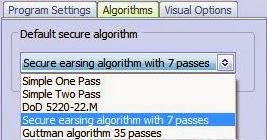
In this utility, you can select different algorithms for deletion as below:-